UX Research on PPORA Data Hub

From Data to Destination: A User-Centered Vision for Outdoor Recreation

Timeline September - October 2025
Team Alvin Cash V, Elyssa Gleeson, Kelly Kenoyer, Julie McMullen, Torian Stiles, Jessica Webb
Role Data Analyst

Project Overview

This usability study evaluated the Pikes Peak Outdoor Partnership Initiative (OPPI) Data Hub, assessing both the live ArcGIS Hub and a high-fidelity Figma prototype with seven representative users. Our research revealed a significant disconnect between the Data Hub's data-centric presentation and the expectations of recreational users, leading to four prioritized recommendations to transform the hub into an accessible, user-friendly resource.

UX Research Usability Testing User Personas Journey Mapping Data Analysis Heuristic Evaluation Think-Aloud Protocol

Market Context

The Thriving Outdoor Recreation Economy

Understanding the economic landscape shaping user expectations

💰
$1.2T

U.S. outdoor recreation economic output

(2023)
⛰️
92%

Colorado residents participating in outdoor recreation annually

📈
$13.9B

Colorado's outdoor recreation industry GDP

The Opportunity

The outdoor recreation sector is a powerful economic force, but users come with high expectations set by mature platforms like AllTrails, Gaia GPS, and Komoot. The PPORA Data Hub must meet these foundational expectations to become an indispensable community resource.

User Personas

We developed three distinct personas representing key audiences for the PPORA Data Hub, each highlighting unique goals, motivations, and needs.

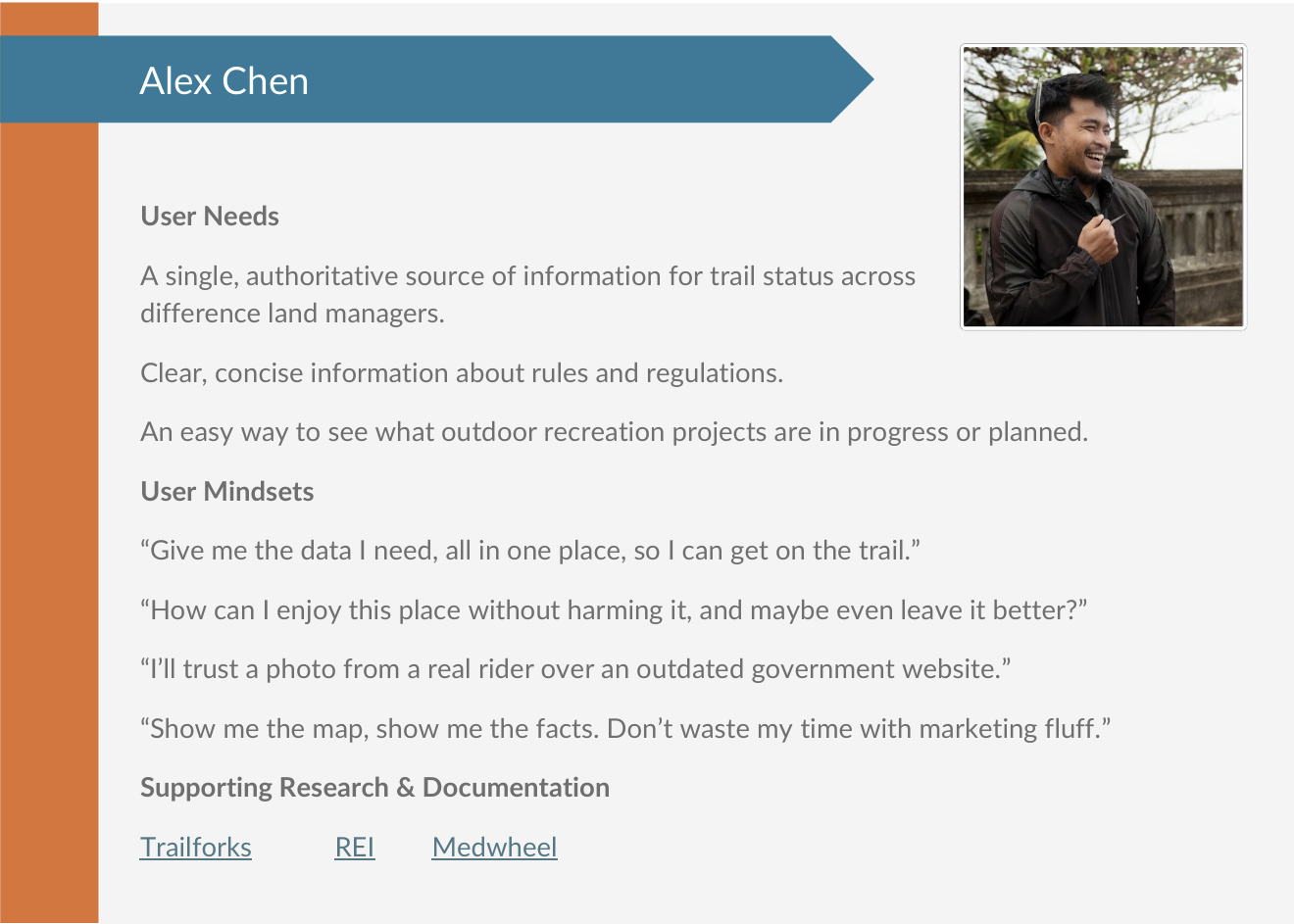
Alex Chen - Outdoor Enthusiast

Alex Chen

Outdoor Enthusiast

34-year-old GIS analyst and avid mountain biker who values reliable trail information and environmental stewardship. Seeks efficient planning tools and volunteer opportunities.

Javier Smith - Business Owner

Javier Smith

Business Owner & Stakeholder

40-year-old mountain biking company owner who needs dependable trail data for his business and customers. Volunteers with local trail organizations.

Josie Sanders - Community Planner

Josie Sanders

Community Planner & Advocate

57-year-old fitness coach with nonprofit management background. Seeks regional recreation data for community engagement and sustainable development.
User Journey Mapping

We constructed a journey map centered on our primary persona, Alex Chen, illustrating his actions, thoughts, and emotional state across four key stages. The map reveals a significant emotional decline from initial curiosity to frustration during the research and planning phase.

Complete User Journey Map for Alex Chen

Alex Chen's Journey: From Discovery to Post-Activity Reflection

Critical Pain Points Identified

User Conflict

Data-heavy, professional focus clashes with recreational planning goals

Information Gaps

Lacks essential details like trail difficulty, length, and current conditions

Ambiguous Navigation

Confusing structure without intuitive search or filtering tools

Usability Testing Results

Methodology

Moderated remote usability tests with seven participants in September and October 2025. Participants completed four core scenarios on both the live ArcGIS Hub and Figma prototype.

Participant Diversity

7
Participants
18-60
Age Range
4
Core Tasks

Key Findings

Using the "See, Say, Do" framework to analyze user behavior patterns

High Severity

Audience & Purpose Mismatch

See:

Users hesitated on homepage, scrolling without clicking. Many ignored map-based links.

Say:

"It seems very data-heavy from more of a professional side, not a consumer side."

Do:

Mismatch led to confusion and immediate disengagement.

High Severity

Lack of Foundational Search & Filtering

See:

Users went directly to search bar, typed "Garden of the Gods," received "No results found."

Say:

"The lack of somewhere to search is throwing me off a lot."

Do:

Nearly all participants failed to find "easy" trails due to missing filters.

High Severity

Insufficient Trail Information

See:

Users clicked trails revealing pop-ups with technical data (e.g., "Activity_C," "Buffer Dist").

Say:

"It's written like a back end instead of a front end, you know?"

Do:

Unable to complete tasks without key information like difficulty and length.

Medium Severity

Confusing Map Interaction & UI

See:

Users overwhelmed by layers and colors. Zooming didn't clarify information.

Say:

"It just looks like a lot of shapes and colors to me, so I don't know where to even start."

Do:

Struggled with map layers and legend, clicking aimlessly without achieving goals.

Prioritized Recommendations

1

Revamp the Homepage for a Recreational User

Redesign the homepage to be task-oriented and visually engaging for the general public. Replace data-centric layout with clear calls-to-action like "Find a Trail," "Explore Parks," or "Plan Your Adventure."

Expected Benefit: Reduced bounce rate, increased user confidence, and a clearer value proposition from the moment users land on the page.
2

Implement a Prominent, Global Search Bar

Add a large, persistent search bar at the top of the homepage and all subsequent pages. This search should query all site content, including parks, trail names, and key locations.

Expected Benefit: Dramatic improvement in findability and task success rates, meeting fundamental user expectations for modern web tools.
3

Develop Standardized "Trail Cards" with Essential Information

Display simple, visually appealing pop-up "cards" containing critical information: trail name, difficulty, distance, estimated time, elevation gain, and allowed activities.

Expected Benefit: Empowers users to make informed decisions, builds trust in the data, and drastically increases the tool's practical value.
4

Simplify Map Filters and Add a Clear Legend

Redesign the map interface with simple, always-visible filtering tools. Allow users to filter trails by difficulty, distance, and activities. Ensure the map legend is clear and concise.

Expected Benefit: Reduced cognitive load, faster task completion, and a less frustrating, more empowering user experience.

Project Impact & Next Steps

Transforming the Data Hub

By implementing these user-centric recommendations, PPORA can transform the Data Hub from a complex data repository into an indispensable, accessible, and highly-utilized resource for the Pikes Peak community and its visitors.

1

Prioritize

Address homepage and search first, as they impact initial interaction and navigation

2

Ideate & Design

Begin wireframing and prototyping new designs incorporating recommendations

3

Iterate & Test

Conduct another round of usability testing to validate improvements

User-Centered Approach

Conducted comprehensive research with diverse user base

Data-Driven Insights

Analyzed qualitative and quantitative data to identify patterns

Actionable Recommendations

Prioritized solutions addressing high-severity usability issues

Next Project

Miniplay Arcade Development